BAS Script License Issuing Automated on Make
A Make scenario that turns one Telegram message into a full licence handover: generated login and password, a licence for the requested term, FingerprintSwitcher Business enabled, and a row written to Google Sheets.
Problem
Every BAS script sale meant a manual chain: invent a login and password, create the user, issue a licence for the right term, separately enable paid FingerprintSwitcher Business fingerprints, and record it somewhere.
Result
Send the bot a number of days and the credentials come back within seconds: user created, licence issued, FP Business attached, Google Sheets row written.
Tech Stack
Overview
This one automates my own business process rather than a client’s. Selling BAS scripts means issuing licences, and before this scenario every handover was a manual chain of four or five actions in different places. Now it looks like this: send the Telegram bot a number of days - 30, say - and get the credentials back.
The scenario is built in Make: generate a login and password, create the user, issue a licence for the requested term, attach FingerprintSwitcher Business, and write the result into Google Sheets.
Problem
The routine accumulated quietly. Issuing a licence is a minute’s work in itself, but it has to be done completely and in the right order: invent a login, invent a password, create the user in the licence manager, issue the licence for the right term - and, since FP Business appeared, separately enable the paid fingerprints, because that is now its own step and an easy one to forget by hand.
Multiply by every sale, and add that it has to happen at any hour, including the ones when you least want to. There is also the question that always follows manual handovers: where do you look up who got what, and when?
Solution
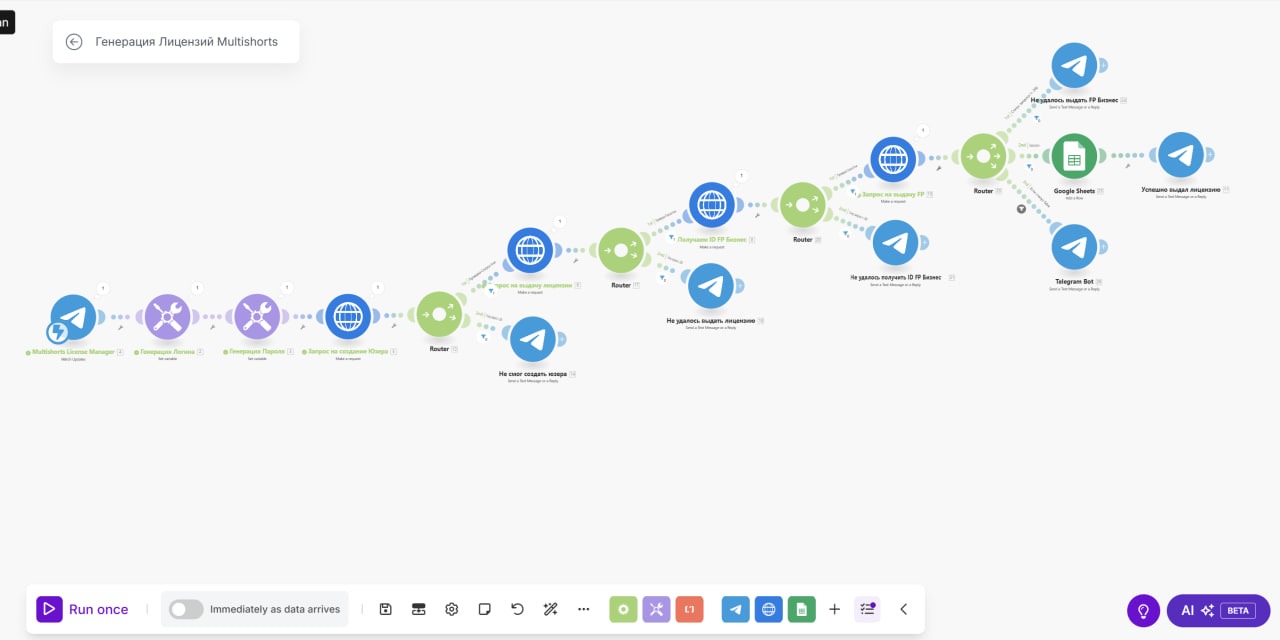
The whole process fits one Make scenario triggered by a Telegram message. From there the chain runs: generate login → generate password → create user request → issue licence request → fetch FP Business ID → grant FP request → write to Google Sheets → confirm in Telegram.
The most interesting part is the one a description usually hides: after every step there is a router with its own error branch. Could not create the user, could not issue the licence, could not fetch the FP Business ID, could not grant FP Business - each gets its own Telegram message. That is what separates working automation from a demo: a chain of six external calls will eventually break at one of them, and the only difference is whether you learn about it immediately, with the step named - or a week later from a client who never received access.
Google Sheets at the end is not reporting for its own sake but the answer to “who got what and when”, which otherwise lives in chat history.
Features
- Issuing triggered by a single Telegram message carrying the licence term in days
- Automatic login and password generation for the new user
- User creation and licence issuing for the requested term through the licence manager API
- A dedicated step for attaching FingerprintSwitcher Business - fetching the ID and granting the paid fingerprints
- A router with an individual error branch after every step, naming exactly what failed
- A handover log in Google Sheets: who, when, and for how long
- Success confirmation sent back to Telegram
Development Process
This scenario was written for myself, and it shows in where the effort went. The happy path - six blocks in a row - comes together in an evening. Everything else went into the error branches, and rightly so: when automation calls an external licence API several times in sequence, a failure at step three leaves the system half-done - user created, licence not issued. Swallowing that silently is worse than not automating at all, so each router reports not “error” but which step failed.
The second observation is about the trigger format. Telegram became the interface because the handover happens in the same place as the conversation with the buyer. No panel is needed for this: minimal input (a number of days), an immediate reply, history in the chat.
Results
- A manual multi-step chain collapsed into one message to a bot
- FP Business is attached automatically and no longer gets forgotten during a handover
- A failure at any step surfaces immediately, with the step named, instead of arriving later via the client
- The handover log maintains itself in Google Sheets rather than in chat history
- Issuing no longer depends on whether you happen to be at a computer
What Was Learned
Automating your own processes is almost always postponed: each individual instance is too small to justify building anything. But the number to weigh is not one handover - it is their sum across a year, including the evenings when a “quick one-minute task” arrives at the wrong moment.
The second takeaway is the same one as in client projects, only tested on myself here: the cost of automation is not in the happy path but in the error branches. A scenario of six external calls with no failure handling is not automation, it is a postponed problem. The same reasoning underpins idempotent pipelines, where every step can be safely repeated.
Services used in this project
Related case studies
- LeadGen Outreach - a Client-Finding System for Freelance MarketplacesMy own CRM with an AI engine: 14 sources of work, task filtering, proposals within each platform's limits, a pipeline up to prepayment, AI reply drafts and a demand analysis across 5,811 tasks.
- Telegram Sales-Funnel Bot for Online CoursesA Telegram bot that runs the whole funnel - lead magnet → guide → intensive → course - with payment, auto-delivery and an admin panel.