Etsy Keyword Finder
A queue-driven keyword audit app for Etsy sellers: submit a listing ID plus up to 20 keywords, and background workers walk the real search results step by step with live screenshots.
Problem
Sellers have no reliable way to see where a listing actually surfaces for a given keyword - manual checking is slow, personalised by their own session, and impossible to repeat consistently across dozens of keywords.
Result
A dashboard that dispatches audit jobs to leased background workers: 20 keywords per job, per-step screenshots, a live step log and a searchable job history with per-status filters.
Tech Stack
Overview
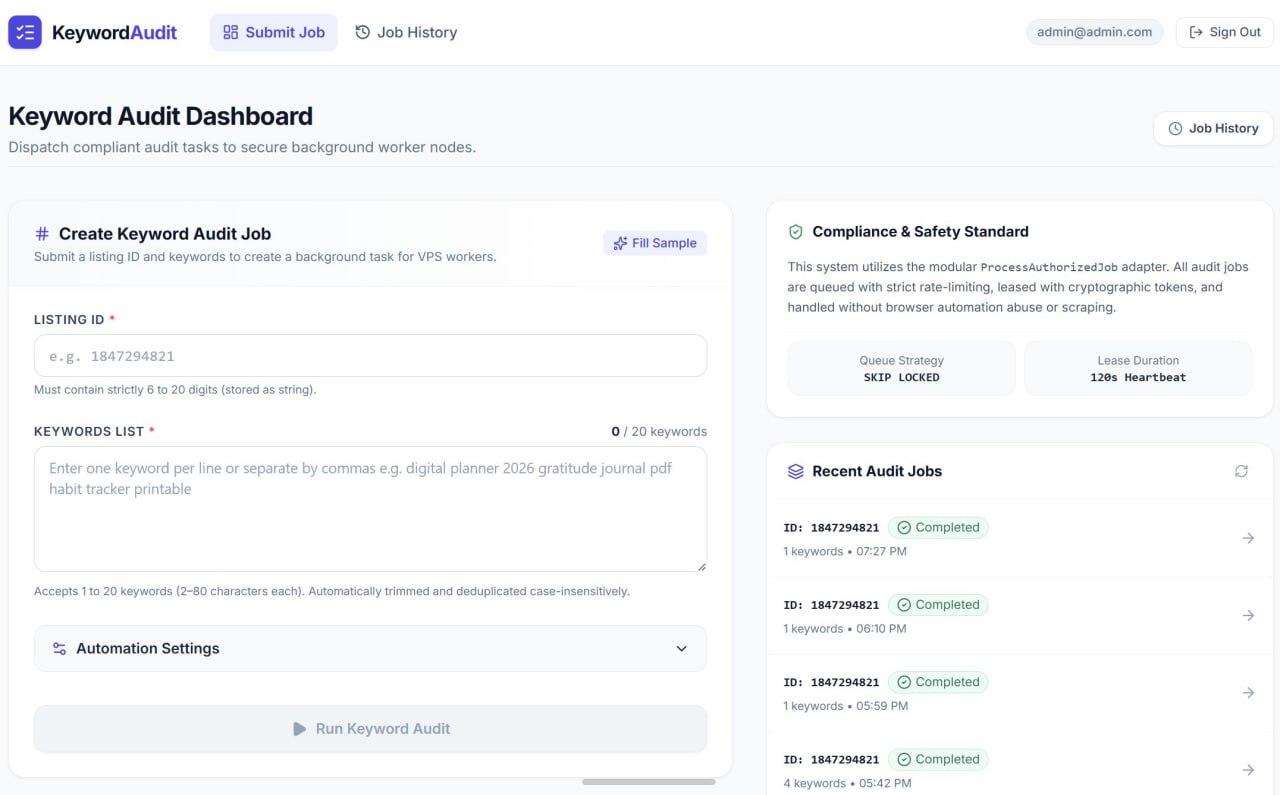
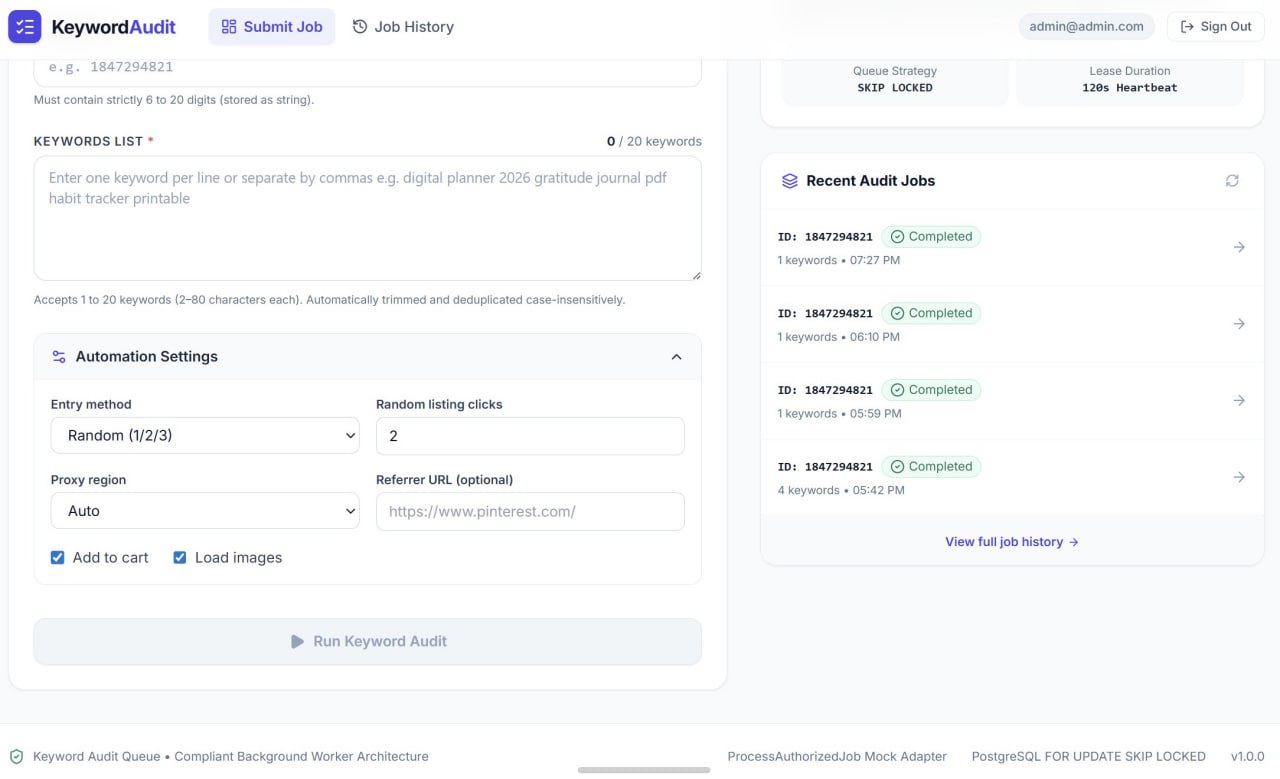
Etsy Keyword Finder is a web app that turns “where does my listing rank for this keyword?” into a repeatable, auditable background job. A seller submits a listing ID and up to 20 keywords, picks how the run should behave, and hits Run. From there the job is queued, leased by a worker node, and executed keyword by keyword - every step captured as a screenshot and a timestamped log line the seller can replay afterwards.
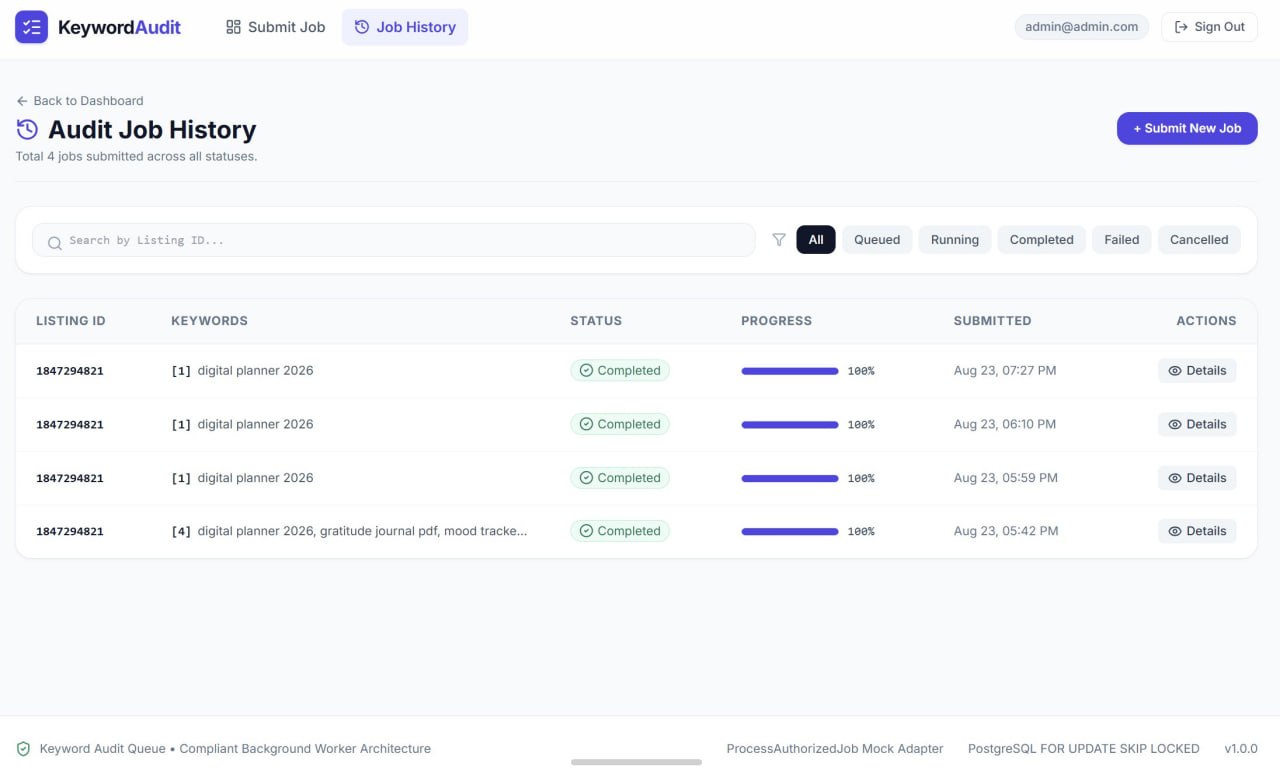
The interface is deliberately split in two: a dispatch side (create the job, watch recent jobs) and a history side (search, filter and open any past run). Nothing about a run is ephemeral - the screenshots and the step log stay attached to the job.
Problem
Checking keyword visibility by hand is unreliable in three separate ways. It is slow - one keyword at a time, one page at a time. It is personalised - a seller’s own logged-in session, location and history skew what they see, so the result is not what a fresh visitor gets. And it is unrepeatable - nothing is recorded, so there is no way to compare today’s check against last week’s, or to prove what actually happened during a run.
Multiply that by twenty keywords and it stops being a task anyone does consistently.
Solution
The app models each check as a job in a Postgres queue. The dashboard validates and normalises the input up front - listing IDs are constrained to 6–20 digits, keyword lists are trimmed and deduplicated case-insensitively, and the 20-keyword ceiling is enforced in the UI before anything is queued. Workers then pull jobs with FOR UPDATE SKIP LOCKED, so several nodes can drain the queue in parallel without ever picking up the same job twice, and each claim is a lease with a 120-second heartbeat - if a worker dies mid-run, the lease expires and the job returns to the queue instead of hanging forever.
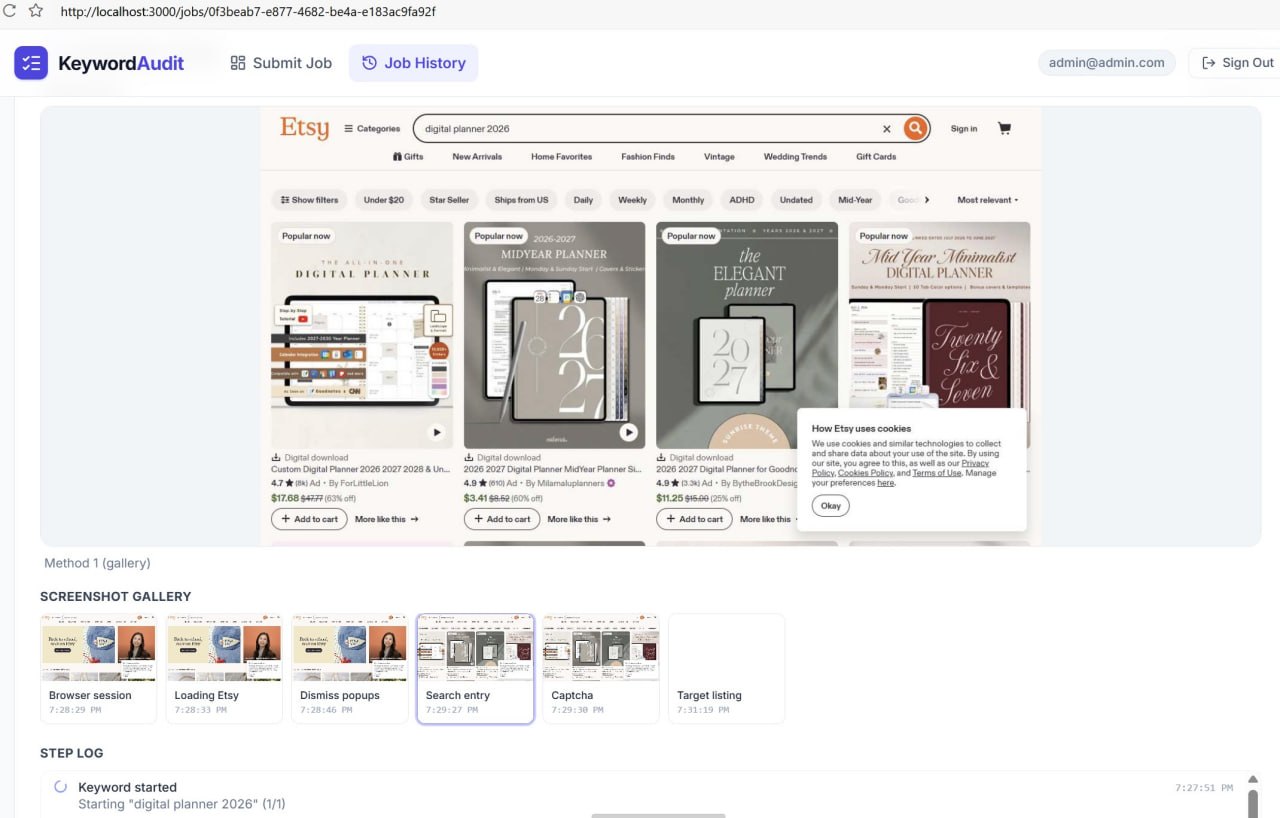
Execution itself is instrumented rather than opaque. Each stage - browser session, page load, popup dismissal, search entry, captcha, target listing - writes a screenshot and a log entry, so the job detail page reads like a flight recorder for the run.
Features
- Job dispatch form with strict validation: 6–20 digit listing ID, 1–20 keywords (2–80 chars each), auto-trim and case-insensitive dedupe
- Automation settings per job: entry method (random 1/2/3), random listing clicks, proxy region, optional referrer URL, add-to-cart and load-images toggles
- Postgres job queue with
FOR UPDATE SKIP LOCKEDclaiming and a 120-second heartbeat lease for crash recovery - Live job view: streaming browser screenshot, per-step screenshot gallery and a timestamped step log
- Job history with full-text search by listing ID and status filters - All / Queued / Running / Completed / Failed / Cancelled
- Per-job progress bars and status badges rolled up across all keywords in the job
- Recent-jobs sidebar on the dashboard with one-click drill-down into any run
- Authenticated access with per-account job scoping
- Modular worker adapter (
ProcessAuthorizedJob), so the execution backend can be swapped or mocked without touching the app layer - Rate-limited dispatch to keep request volume modest and predictable
Development Process
The queue came first, because everything else depends on it behaving correctly under concurrency. SKIP LOCKED plus a heartbeat lease is a small amount of SQL that removes an entire class of failures: no double-processing, no jobs stuck in running because a VPS rebooted. Only once claiming and requeuing were solid did the run instrumentation go in - and that turned out to be the feature that matters most in daily use, because a keyword audit you cannot inspect is a keyword audit you cannot trust.
The worker sits behind a single adapter interface, which kept the front end developable against a mock while the real automation was still being tuned, and keeps the dashboard indifferent to how a run is actually executed.
Results
- A twenty-keyword audit is one form submission instead of an afternoon of manual checking
- Every run is reproducible and reviewable - screenshots and step log persist with the job
- Multiple worker nodes drain the same queue safely, so throughput scales by adding nodes
- Crashed runs self-heal: the lease expires and the job is re-queued rather than lost
- History with search and status filters makes week-over-week comparison a normal habit rather than a manual exercise
What Was Learned
The interesting engineering here was not the browser automation - it was the queue semantics around it. Getting claiming, leasing and requeuing right at the database level meant the rest of the system could stay simple: workers are stateless, the app never tracks who is doing what, and scaling out is just running another node.
The second lesson was about trust. Screenshot-per-step started as a debugging aid for me and ended up being the product’s most valuable surface for the user, because it turns an automated claim into visible evidence. It is the same instinct as the live console in the RPA Automation Panel - when a system acts on your behalf, showing your work is a feature, not overhead.
Services used in this project
Related case studies
- LeadGen Outreach - a Client-Finding System for Freelance MarketplacesMy own CRM with an AI engine: 14 sources of work, task filtering, proposals within each platform's limits, a pipeline up to prepayment, AI reply drafts and a demand analysis across 5,811 tasks.
- Telegram Sales-Funnel Bot for Online CoursesA Telegram bot that runs the whole funnel - lead magnet → guide → intensive → course - with payment, auto-delivery and an admin panel.