TikTok Auto-Scheduler for Recipe Videos
A CLI tool that matches finished recipe videos to their captions and schedules them to TikTok one per day via the PostMyPost API.
Problem
A content creator had a folder per recipe full of raw and finished clips, plus a separate recipe database - and was picking the right video, writing the caption and scheduling each TikTok post by hand, one day at a time.
Result
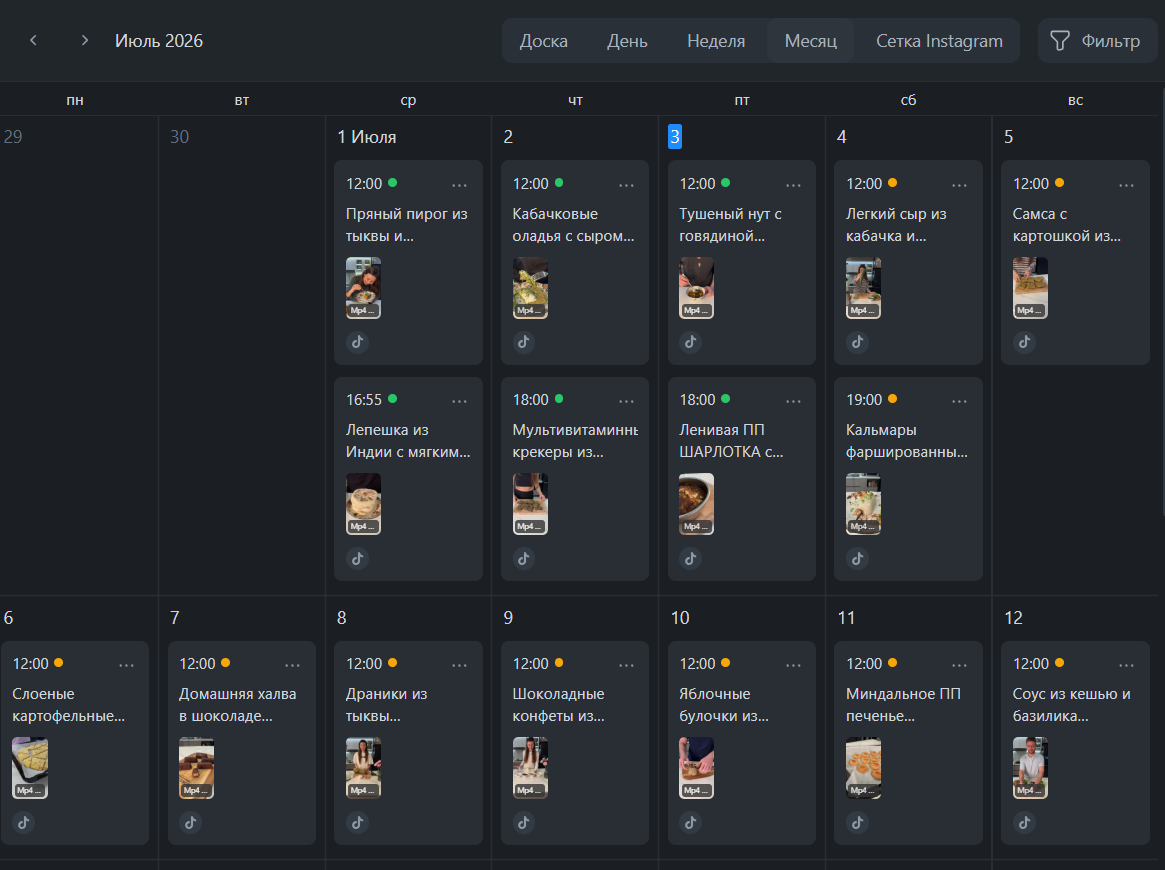
A two-step CLI that auto-picks the finished video in each folder, fuzzy-matches it to its recipe for the caption, and schedules the whole batch to TikTok one post per day - with a review step, dry-run, resumable state and per-post TikTok settings.
Tech Stack
Overview
A command-line tool that turns a messy tree of recipe folders into a scheduled TikTok posting calendar. It scans every folder, picks the finished video (ignoring raw editing clips), fuzzy-matches it to the right row in a recipe database to build the caption, and schedules the batch to a TikTok account through the PostMyPost API - one post per day, oldest clip first. Every post is created with the creator’s TikTok settings: public, comments/duet/stitch allowed.
Problem
The creator had one folder per recipe, each mixing raw editing material (IMG_*.MOV, Gen_*.mp4) with the one finished video, and a separate CSV of recipes with titles and descriptions. Getting a video onto TikTok meant, for every folder: find the finished clip, find its recipe, write the caption, and schedule it for the next free day - repeated dozens of times, by hand, with real risk of double-posting or missing a day.
Solution
The tool splits the job into two deliberate steps so a human stays in control of what actually gets posted. Step 1 - build the mapping: it scans folders offline, picks the finished video, fuzzy-matches the filename to a recipe row, and writes a mapping.csv with a status per row (OK, REVIEW, AMBIGUOUS, NO_VIDEO, SKIP) plus a confidence score and an editable caption. The creator fixes only the flagged rows and edits captions freely. Step 2 - schedule: only OK rows are sent, oldest video first so the newest clip lands last, at one post per calendar day. A dry-run mode and a --limit 1 first-post check let you verify before committing the batch, and every scheduled folder is recorded in .scheduled_state.json so re-running never double-posts and simply continues from the next free day.
Features
- Auto-picks the finished video per folder, ignoring raw editing clips (
IMG_*,Gen_*) - Fuzzy-matches videos to recipe rows for captions, with a confidence score and human-review flags
- Two-step workflow: reviewable
mapping.csv, then schedule only theOKrows - One post per day, oldest → newest, with configurable start date and post time
- Dry-run and single-post modes to verify before scheduling the whole batch
- Resumable via
.scheduled_state.json- safe re-runs, no duplicates, continues from the next free day - Per-post TikTok settings (public, comment/duet/stitch) and a delete command, all env-configurable
Development Process
The core insight was to keep a human checkpoint exactly where automation is weakest - matching a video to its recipe. Rather than trust fuzzy matching blindly, the tool exposes its confidence and flags anything uncertain for review, so the creator confirms the doubtful cases and nothing gets posted with the wrong caption. Idempotency was the other priority: because a scheduling run touches a live social calendar, every action is recorded and re-runs are safe by design, with a dry-run to see exactly what would happen first.
Results
- Dozens of recipe videos scheduled to TikTok from a single batch command, one per day
- Captions matched to the right recipe automatically, with human review only where it’s uncertain
- Safe, resumable runs - no double-posts, no skipped days, continues where it left off
- Fully configurable via environment variables (project, dates, time, per-day count, TikTok settings)
What Was Learned
Automation earns trust by being honest about its uncertainty. Surfacing the match confidence and forcing a review step on the ambiguous rows - instead of silently posting a best guess - is what made a bulk scheduler safe to point at a real, public TikTok account. Combined with recorded state and a dry-run, the boring reliability work is exactly what let the creator hand the whole calendar to a script.
Services used in this project
Related case studies
- LeadGen Outreach - a Client-Finding System for Freelance MarketplacesMy own CRM with an AI engine: 14 sources of work, task filtering, proposals within each platform's limits, a pipeline up to prepayment, AI reply drafts and a demand analysis across 5,811 tasks.
- Telegram Sales-Funnel Bot for Online CoursesA Telegram bot that runs the whole funnel - lead magnet → guide → intensive → course - with payment, auto-delivery and an admin panel.